
Commesse.Cloud · Features
Materials
From the item catalog to the materials used on a project, keep a clear record of quantities and costs. Every movement is tied to a project and can be linked to a WBS task.
Start for free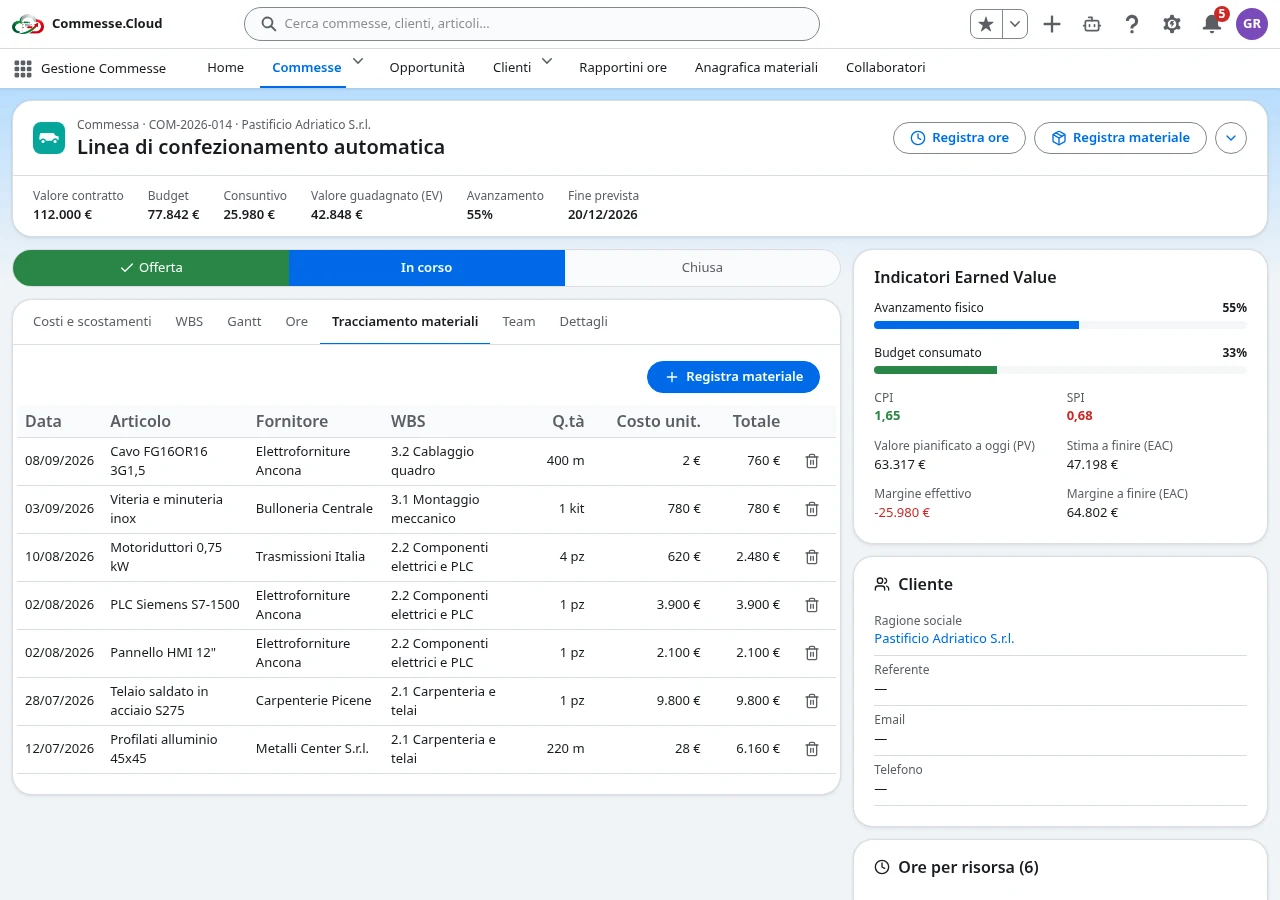
Materials in your project
A shared catalog
Administrators manage the catalog with code, description, category, supplier, unit of measure, standard cost and notes. A common reference cuts down on duplicate descriptions in entries.
Search and fill in from the item
When you log a material, search for the item by code, description, category or supplier. Selecting it pulls in the catalog data to make filling in the movement easier.
Free-text items too
For a material that isn’t in the catalog, turn on the Free-text item flag and enter the details of the entry. You can link the movement to a work package or directly to the project: the WBS is not required.
Quantities that become costs
Record date, quantity, unit of measure and unit cost. The movement total is calculated as quantity times unit cost and adds to the project’s actuals. You’ll find the movements in the project’s materials tab.
Step by step
In everyday work
- 1Set up the catalog with your most frequently used items.
- 2Log the material on the project, choosing a catalog item or a free-text item.
- 3Review the movements and how they add to the project’s costs.
Materials and costs tracked on the project, without mixing up catalog and reporting.